Subscribe with RSS or ATOM Add to Google


Monday, October 30, 2006

Having fun with .NET 3.0- WCF, WWF, and WPF in Visual Studio 2005

In my previous blog I complained that the Microsoft Pre-release Software Visual Studio Code Name "Orcas" - September Community Technology Preview (CTP) didn't include Windows Workflow Foundation (WWF), Windows Presentation Foundation (WPF), and Windows Communication Foundation (WCF) tools.

I thought I would compile a list of links that allows for development with WCF, WWF, and WPF.

I have had a lot of fun with the downloads that let you run WCF, WWF, and WPF in Visual Studio 2005, as well as the new visual designer tools Microsoft is releasing.

The tools have been remarkable stable and the Windows SDK contains a ton of samples.

Download the following to begin playing around with WCF, WWF, and WPF:

NET Framework 3.0 RC 1
Windows SDK
"Orcas" .NET 3.0 Development Tools
Windows Workflow Foundation Extensions
Expression Web Designer
Expression Graphic Designer
Expression Interactive Designer

I would also suggest these books.

Thursday, October 26, 2006

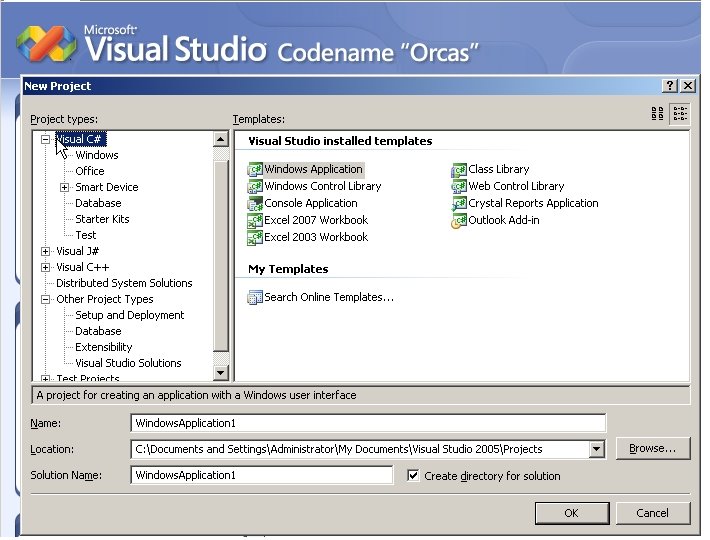
Visual Studio Codename "Orcas" does not include WCF, WWF, and WPF tools

I guess I should have looked closer at what was included in the Microsoft Pre-release Software Visual Studio Code Name "Orcas" - September Community Technology Preview (CTP).


(Click image for larger view)


I assumed (wrongly) that it would include WCF, WWF, and WPF tools. I was disappointed to learn it doesn't.

This is what it actually includes (From the CTP download site):

The highlights of this CTP include:

  • Improvements on the widely acclaimed Visual Studio 2005 product set
  • Significant investments in improving product quality
  • LINQ to Objects API
    • LINQ to Objects API supports queries over any .NET collection, such as arrays and Generic Lists. This API is defined in the System.Query namespaces inside System.Core.dll. Click here for more details about LINQ.
  • Partial C# 3.0 Language Support: This CTP implements some of the new language features of C# 3.0
    • Local variable type interface
    • Lambda expressions
    • Object initializers
  • Partial C# 3.0 IDE Support: In addition to the C# 3.0 language features there is partial IDE support
    • Colorization and New Keywords in Completion List
    • Edit and Continue Rude Edit Detection
  • Partial VB 9.0 Language support (Due to differences in feature delivery schedules VB implementations of the above C# features will appear in a future CTP)
    • Local variable type inference and Option Infer switch
  • VSTS Improvements in load & unit testing such as unit test for devices
  • Device development improvements
    • VSTS integration
    • Access and modify device security configuration from the IDE
  • Enables developers to build and debug a Windows Vista Application
  • Enables Visual Studio Tools for Office developers to build document-level customizations for Word and Excel 2007
  • Enables eMbedded Visual C++ 4.0 developers to use Visual Studio Code Name "Orcas" to build their existing applications
  • NET Framework improvements such as:
    • New managed add-in model enables developers to add a version-resilient extensibility model to their products.
    • Support for time zone conversion, enumeration and serialization, including cases where Daylight Saving Time rules change over time.
    • Reflection in Partial Trust, enabling sand box scenarios for all applications that depend on these features.
    • The ability to control the garbage collector's latency mode
    • Improved CLR ThreadPool micro-performance and throughput for worker and IO completion

Hamachi- Free VPN like cool tool. Remote Access your home PC from work.

Hamachi is a very cool free tool to set up a tunnel for networking to several different PCs.

Get it here.

Monday, October 23, 2006

Two Excellent Books- Essential Windows Workflow Foundation and Applications = Code + Markup: A Guide to the Microsoft Windows Presentation Foundation

Applications = Code + Markup: A Guide to the Microsoft Windows Presentation Foundation

This is an excellent book. It is all about code, code, more code, and then XAML, XAML, and more XAML. It does an excellent job of showing how all the new presentation features work at a code level.

Although there are a lot of new tools coming out that may keep a person from learning the code level details of WPF, I'd suggest learning the guts of how it works. If you are like me and like knowing how things work at a low level, this book will definitely teach you.

Every chapter is packed full of real world examples. The code that comes with the book is excellent.

If you want know WPF inside and out, you must read this book.

Get it here.

Essential Windows Workflow Foundation

This book is awesome. It explains the logic behind WWF, and why it is needed for long processing business logic.

Every chapter is very thorough and well written. If you want to learn all about WWF, this book is a must read.

The below points are from the back cover. The books covers all of these areas in an easy to read format and very thoroughly. I highly recommend reading this book!!!!!

The core concepts and ideas that form the heart of WF's programming model

The execution model for activities, with details of the activity automaton, bookmarking, scheduling, and the threading model of the WF runtime

Advanced execution concepts, including activity execution contexts, transactions, persistence points, passivation, fault handling, cancellation, compensation, and synchronization

Hosting the WF runtime in applications

The activity component model, with details of validation, compilation, serialization, and visualization

Databinding, XAML, dependency properties, and WF program metadata

Declarative conditions and rules, activity designers, and designer hosting

Custom control flow patterns ranging from simple sequencing and iteration to more complex graphs and state machines

Dynamic editing of running WF program instances

Get it here.

.NET 3.0- Windows Workflow Foundation (WWF), Windows Presentation Foundation (WPF), and Windows Communication Foundation (WCF) Free Clinics

These 3 courses are pretty good introductions to Windows Workflow Foundation (WWF), Windows Presentation Foundation (WPF), and Windows Communication Foundation (WCF).

You can't beat it for free.

Collection 5134 : Developing Rich Experiences with Microsoft® .NET Framework 3.0 and Visual Studio® 2005

Topics covered within the collection include:
Windows Presentation Foundation
Windows Workflow Foundation
Windows Communication Foundation

Get it here.

Wednesday, October 18, 2006

.NET 2.0 and .NET 3.0 RTF Controls are greatly lacking.

I was recently asked to investigate RTF controls for a .NET 2.0 Smart Client project. There problem was tables pasted into the RTF control from an RTF document they were using were loosing their format. Below is the email I sent the team. It amazes me that none of them worked.

You've got a pretty big problem. The components are either not capable of handling all the functionality Word and Wordpad have built into them, or MS has built their RTF engine to act differently.

I have tried all of the companies listed below with no luck. The best ones were the HTML editors. I have attached the NetRix Demo exe (WordEditing.zip). I am not sure if the application's logic would allow for HTML editing instead of RTF, but that would be the best option from what I have seen.

This is from the MS RTF specification:
Tables
Tables are probably the hardest part of RTF to read and write correctly. Because of the way Microsoft word processors implement tables, and the table-driven approach of many Microsoft RTF readers, it is very easy to write tables in RTF that are not compatible with Microsoft word processors when you try to read the RTF.

This is from a site I found:
Disadvantages of RichTextBox

  • The RichTextBox control only supports a single page. Although, you can simulate multiple pages by displaying and/or printing a series of 1-page documents.
  • No support for table layouts in your documents
  • No support for page headers or footers


The Demos I tried:
Syncfusion Essential Studio.
Infragistics
TX Text Control 13.0.NET
TextDynamic .NET
Janus WinForms Controls Suite for .NET
Xceed Editors for .Net
Developer Express
ComponentOne
Aspose
Sub Systems- TE Edit Control
Gnostice eDocEngine ActiveX/.NET
NetRix (HTML Editor)
Cute Editor (HTML Editor)
FCKeditor (HTML Editor)
The .NET 3.0 RichText Textbox control
a few other custom built controls from individual developers
and building an interop with winpad's Msftedit.dll and Riched20.dll

Sorry I couldn't find any RTF controls that work.
Tad